
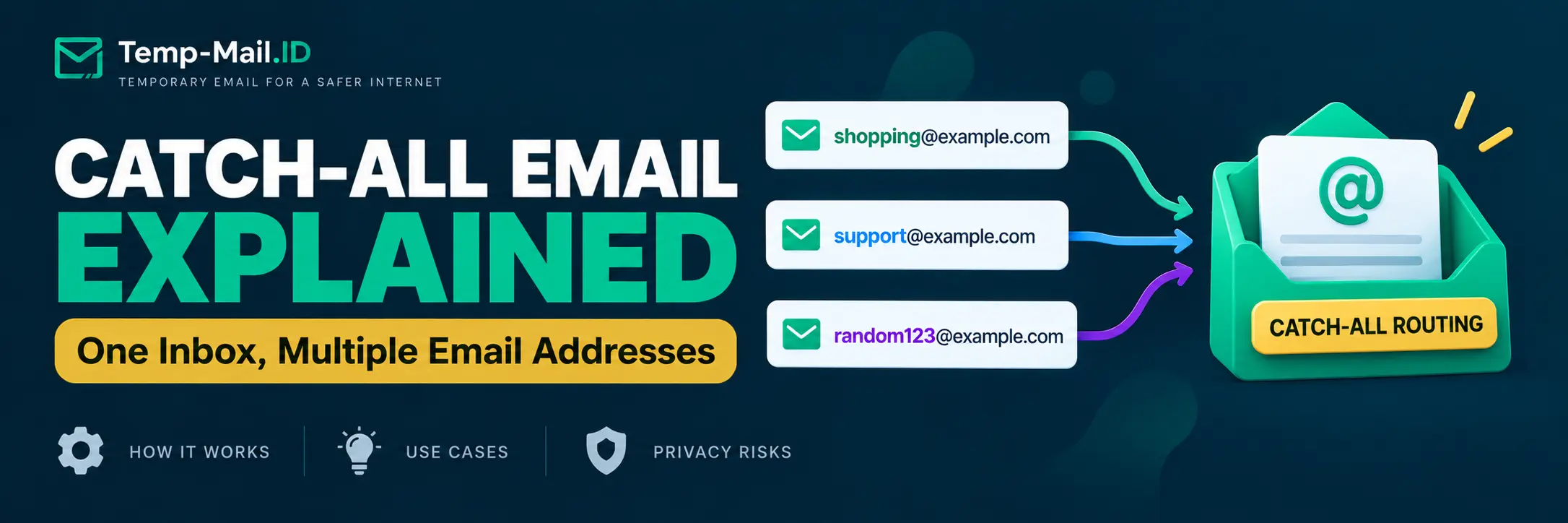
Imagine owning the domain example.com and receiving an email sent to shopping@example.com, even though you never created that mailbox.
Now imagine receiving another message sent to newsletter@example.com, followed by one addressed to a completely random name at the same domain.
That is possible when a domain has catch-all email routing enabled.
A catch-all email address allows a mail system to handle messages sent to addresses that do not have individual mailboxes or explicit routing rules. Instead of rejecting those messages, the system can deliver them to a designated destination.
This can be useful for businesses, domain owners, and developers who need flexible email routing. It can also create problems when unwanted messages, mistyped addresses, and spam begin arriving at the same destination.
Understanding how catch-all email works helps you decide whether it belongs in your email setup or whether a regular alias, plus address, or temporary inbox would be more appropriate.
What Is a Catch-All Email Address?
A catch-all email address is a mailbox or forwarding destination configured to receive messages sent to otherwise unrecognized addresses at a domain.
For example, suppose you own:
example.com
You have created one mailbox:
hello@example.com
Normally, messages addressed to an unknown recipient such as random@example.com may be rejected because that address does not exist.
With catch-all routing enabled, the mail system can accept the message and deliver it to a designated inbox instead.
The destination might be:
inbox@example.com
That inbox could receive messages addressed to:
- shopping@example.com
- newsletter@example.com
- contact@example.com
- random123@example.com
- misspelled@example.com
The exact behavior depends on the mail provider and its routing configuration.
The important distinction is that these addresses do not necessarily represent separate mailboxes.
How Catch-All Email Routing Works
Email delivery begins with a sender attempting to deliver a message to an address at a particular domain.
The sending mail server identifies where that domain receives email and attempts delivery through the appropriate mail infrastructure.
The receiving system then determines what should happen to the recipient address.
In a conventional configuration, the system checks whether the recipient corresponds to an existing mailbox, alias, or routing rule.
If no valid recipient is found, the message may be rejected.
A catch-all rule changes how otherwise unrecognized recipients are handled.
Instead of rejecting the message, the receiving system can direct it to a configured destination.
Example: Email Routing With and Without Catch-All
| Incoming Address | Without Catch-All | With Catch-All |
|---|---|---|
| hello@example.com | Delivered to the existing mailbox | Delivered to the existing mailbox |
| shopping@example.com | May be rejected if unrecognized | Can reach the catch-all destination |
| newsletter@example.com | May be rejected if unrecognized | Can reach the catch-all destination |
| helo@example.com | May be rejected as an unknown recipient | Can reach the catch-all destination |
| random123@example.com | May be rejected if unrecognized | Can reach the catch-all destination |
This table assumes the catch-all rule applies to otherwise unrecognized recipients. Explicit mailbox and routing rules may take priority, depending on the provider.
Catch-all routing also does not guarantee that every message will be accepted. Spam filtering, sender reputation checks, message policies, and other delivery controls may still apply.
What Can You Use Catch-All Email For?
Catch-all email has several legitimate uses, particularly when you control your own domain.
1. Receive Messages Sent to Misspelled Addresses
One practical use is recovering messages sent to an address with a typo.
Suppose your business uses:
support@example.com
A customer accidentally sends a message to:
suport@example.com
Without catch-all routing, the message may be rejected.
With a suitable catch-all rule, the message can reach a mailbox where someone can review it.
This can be useful for organizations that regularly receive email from customers who may not remember an address correctly.
2. Create Recipient Variations Without Separate Mailboxes
A domain owner may want to use different addresses for different websites without creating a new mailbox every time.
For example:
- store1@example.com
- store2@example.com
- newsletter1@example.com
- softwaretrial@example.com
If catch-all routing is configured, these addresses can deliver to the same destination without requiring individual mailbox creation.
This can make signup organization easier.
However, it also means that anyone who knows your domain may be able to send messages to arbitrary local parts that reach the same catch-all destination.
3. Support Email Testing
Developers sometimes need to test applications that send messages to many different recipient addresses.
A catch-all domain can help in a controlled testing environment where all test messages should arrive at one destination.
For example, a QA team might use:
- test-user-001@example.com
- test-user-002@example.com
- test-user-003@example.com
These variations can support registration, onboarding, and transactional email testing.
Testing should use a domain the team controls and a receiving system configured for the intended test cases.
For additional testing methods, read our temporary email for QA testing guide.
4. Handle Addresses From an Older Email Setup
Organizations sometimes change their email structure.
An old department address may no longer have a dedicated mailbox, but external contacts may continue using it.
A catch-all destination can help administrators identify messages addressed to old or forgotten local parts.
For known legacy addresses, explicit forwarding rules or aliases are often easier to manage and less exposed to unwanted mail.
Does Catch-All Email Create Unlimited Email Addresses?
It depends on what you mean by an email address.
A catch-all configuration can allow many different recipient strings at one domain to reach a destination without provisioning each one as a mailbox.
That does not mean the provider has created unlimited independent email accounts.
For example:
alpha@example.com
and:
beta@example.com
may both deliver to the same inbox.
They do not necessarily have separate passwords, independent storage, individual mailbox permissions, or the ability to send messages using those addresses.
Sending from an arbitrary catch-all address may require additional configuration and provider support.
Catch-all routing primarily concerns incoming email delivery.
What Are the Security and Privacy Risks?
The convenience of accepting messages for unknown recipients comes with trade-offs.
1. More Opportunities for Spam
A domain without catch-all routing can reject messages addressed to nonexistent recipients.
With catch-all routing, many of those messages may instead reach the configured destination.
Someone sending unwanted email does not need to know a real mailbox name if arbitrary recipient names are accepted.
This can increase the amount of spam the destination receives, especially when the domain is publicly known.
Spam filters and routing rules can reduce the problem, but catch-all routing does not eliminate the need for them.
For general inbox protection, see our guide on how to protect your email from spam.
2. Messages Intended for Other Recipients
Catch-all routing can collect messages sent to mistyped addresses.
That is useful when recovering legitimate business communication, but it also means the destination may receive information that was not intentionally addressed to its operator.
Organizations should limit who can access the catch-all destination and establish a policy for handling misdirected messages.
A catch-all inbox should not be treated as permission to use or disclose information that arrived by mistake.
3. A Single Destination Becomes More Important
When many addresses forward into one mailbox, that destination becomes responsible for receiving a large portion of the domain's incoming mail.
If the destination is unavailable, misconfigured, or affected by filtering problems, multiple recipient variations may be affected.
Administrators should monitor routing health and avoid relying on one loosely managed mailbox for important communications.
4. Catch-All Does Not Guarantee Anonymity
Using different local parts at one domain can reduce reuse of the exact same email address.
However, every address still shares the same domain.
Someone who recognizes that the domain belongs to you may be able to associate those addresses with the same domain owner.
Other information, including account details, payment information, phone numbers, and device identifiers, may also connect activities.
Catch-all email is a routing feature, not an anonymity system.
Our article on why using the same email address everywhere increases exposure explains how to separate important and lower-priority accounts more deliberately.
Catch-All Email vs Plus Addressing
Catch-all routing and plus addressing can both deliver multiple address variations to one mailbox.
They work differently.
Plus addressing typically uses a known mailbox name followed by a separator and a tag.
For example:
alex+shopping@example.com
On a supporting mail system, this can route to the mailbox associated with:
alex@example.com
Catch-all routing does not require the incoming local part to follow that structure.
For example:
shopping@example.com
could reach a catch-all destination even when no shopping mailbox exists.
| Feature | Catch-All Email | Plus Addressing |
|---|---|---|
| Address format | Arbitrary local part at a configured domain | Existing local part plus a tag |
| Example | shopping@example.com | alex+shopping@example.com |
| Requires existing base mailbox | Not for each recipient variation | Usually yes |
| Needs domain-level routing | Yes | Depends on provider implementation |
| Base mailbox visible | Not necessarily | Usually easy to infer |
| Can receive unknown local parts | Yes, when configured | Not generally the purpose |
| Potential spam exposure | Can be substantial | Depends on mailbox exposure and provider filtering |
For a detailed explanation of tags, supported formats, and privacy limitations, read our plus addressing email guide.
Catch-All Email vs Aliases vs Temporary Email
These tools solve different problems.
A catch-all configuration handles otherwise unrecognized recipients at a domain.
An email alias provides an alternate address that routes to another mailbox or destination.
A temporary email service provides a short-term receiving address intended for interactions where future access is unnecessary.
Email Routing and Privacy Decision Matrix
| Method | Requires Your Own Domain | Separate Mailbox | Long-Term Access | Best Use |
|---|---|---|---|---|
| Catch-all email | Typically requires control of domain routing | No separate mailbox per variation | Possible while routing remains active | Unknown recipients, typos, controlled domain testing |
| Plus addressing | No, if your provider supports it | Usually no | Yes through the underlying mailbox | Filtering and signup-specific tags |
| Email alias | Depends on provider | Usually no | Yes while the alias remains active | Ongoing address separation |
| Secondary mailbox | No | Yes | Yes | Independent ongoing communication |
| Temporary email | No | Separate temporary receiving inbox | Not intended for long-term recovery | Short-term, low-risk interactions |
If you need an address for an ongoing service, an alias or permanent mailbox may be more suitable than a temporary inbox.
If you need a separate address for a short-term, low-risk task, temporary email may be simpler than maintaining your own domain and catch-all configuration.
Our temporary email vs email alias comparison
How to Set Up Catch-All Email Safely
The setup process depends on your email provider.
Before enabling catch-all routing, confirm that you control the domain and understand where incoming messages will be delivered.
Google Workspace
Google Workspace supports catch-all routing through its administrative Gmail routing settings.
Administrators can choose a destination such as an existing mailbox, a dedicated mailbox, or a Google Group.
Google documents the process in its catch-all mailbox configuration guide.
Check the current administrator instructions before changing production mail routing, since settings and available options may differ by environment.
Cloudflare Email Routing
Cloudflare also documents a catch-all rule for Email Routing.
Its routing configuration can direct messages to a verified destination or process them through an Email Worker, depending on the selected rule.
Cloudflare's Email Routing documentation describes the available actions and configuration options.
Make sure the destination address is verified and that the rule behaves as expected before relying on it.
General Setup Checklist
- Confirm that you control the domain and its email routing configuration.
- Choose a mailbox or destination for unrecognized recipients.
- Review existing mailboxes, aliases, and routing rules.
- Enable catch-all handling through your provider's supported settings.
- Verify the destination address when required.
- Send a controlled test message to an unrecognized local part.
- Confirm that existing addresses continue receiving messages correctly.
- Review spam filtering and access permissions.
- Monitor incoming volume and unexpected recipients.
- Document how to disable the rule if it causes problems.
A catch-all rule should be treated as a deliberate mail-routing decision, not as a setting that must be enabled on every domain.
Should You Enable Catch-All Email?
The answer depends on your purpose.
Catch-all routing can be useful when you own a domain and have a specific reason to receive messages sent to otherwise unknown recipients.
It may be worth considering for controlled testing, legacy address handling, or recovering occasional messages sent to misspelled business addresses.
It may be unnecessary if you only use a few known addresses.
In that situation, explicitly configured aliases can provide more predictable routing while allowing the mail system to reject unrelated recipients.
For personal privacy, catch-all routing also introduces administrative work that many users do not need.
Owning a domain, maintaining email routing, managing spam, and protecting the destination mailbox are ongoing responsibilities.
If your only goal is to avoid exposing your permanent email during a short-term signup, a separate temporary inbox may be more practical.
Can You Use Catch-All Email for Account Verification?
Yes, a correctly configured catch-all destination can receive verification emails sent to recipient variations at your domain.
However, receiving the message depends on the sender actually sending it, the domain's routing configuration, and any applicable filtering or validation rules.
A website may also apply its own email acceptance policies.
Catch-all routing does not bypass a website's verification requirements.
For important accounts, use a stable address that you control and can recover reliably.
For short-term, low-risk interactions where future recovery is unnecessary, a temporary email address can provide a separate receiving inbox without requiring you to configure domain-level mail routing.
Frequently Asked Questions
What is a catch-all email address?
A catch-all email address is a destination configured to receive messages sent to otherwise unrecognized addresses at a domain. For example, if shopping@example.com does not have its own mailbox, a catch-all rule may deliver the message to a designated inbox. The exact behavior depends on the provider and its routing configuration.
Does catch-all email receive every message sent to a domain?
Not necessarily. Existing mailbox and routing rules may take priority, and spam filtering or delivery policies can still reject messages. A catch-all rule generally handles recipients that would otherwise be unrecognized. Its behavior should be verified through controlled testing rather than assuming every message will reach the destination.
Is catch-all email safe to use?
Catch-all routing is a legitimate email feature, but it can increase exposure to spam and misdirected messages. Security depends on the provider, destination mailbox, access controls, and filtering configuration. It is best enabled for a specific purpose with appropriate monitoring rather than as an automatic default for every domain.
Is catch-all email the same as an email alias?
No. An alias is generally an explicitly configured alternate address that routes to another mailbox or destination. A catch-all rule handles otherwise unrecognized recipients across a domain. Both can deliver messages to one inbox, but catch-all routing may accept many recipient variations that were never individually configured.
Can catch-all email hide my real email address?
It can avoid exposing a particular mailbox name when you use different recipient variations on your own domain. However, the shared domain remains visible, and other information may still connect those addresses to you. Catch-all routing should not be treated as an anonymity feature or a replacement for broader privacy practices.
Can I use catch-all email instead of temporary email?
You can use catch-all routing for certain low-risk interactions if you control the domain and want ongoing control over incoming addresses. However, it requires domain and routing management. Temporary email is generally simpler for short-lived tasks where future access is unnecessary. Neither approach should replace a secure permanent mailbox for important accounts.
Final Thoughts
Catch-all email routing is useful when you need a domain to handle messages sent to addresses that were never individually created.
It can recover mistyped messages, support controlled testing, and simplify certain domain-level email workflows.
But accepting unknown recipients can also increase spam exposure and create additional responsibilities for the person managing the destination inbox.
Choose catch-all routing when you need that specific behavior. Choose plus addressing for simple tags, aliases for ongoing address separation, and separate mailboxes when independent access matters.
For short-term, low-risk tasks where you do not need to manage a domain or recover an account later, Temp-Mail.ID provides a temporary inbox for receiving email without sharing your permanent address.