
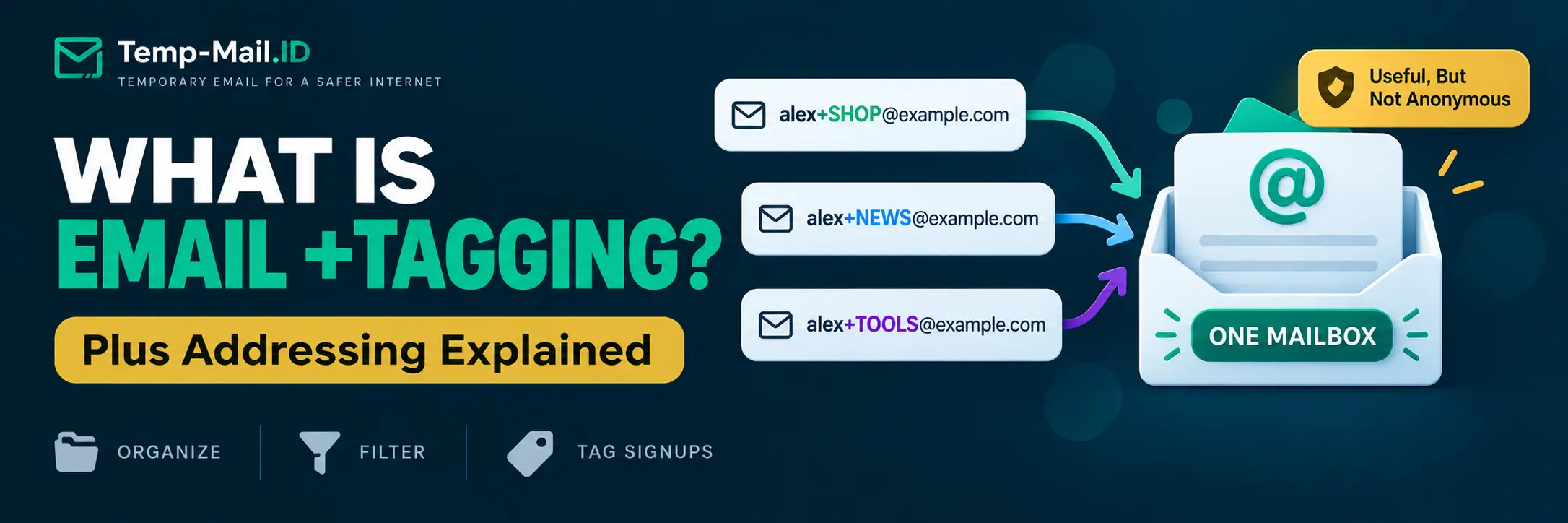
You may have seen an email address that looks slightly unusual:
alex+shopping@example.com
The part after the plus sign is not necessarily a separate mailbox. On email systems that support plus addressing, the message can still arrive in the mailbox for alex@example.com.
This feature is called plus addressing, subaddressing, or sometimes email tagging. It can be useful for organizing messages, creating signup-specific addresses, identifying where an address was used, and separating different types of incoming mail without maintaining dozens of inboxes.
But plus addressing has an important privacy limitation. The original address is often easy to infer because the base address remains visible before the plus sign.
Understanding that distinction makes it much easier to decide when plus addressing email is useful and when an alias, secondary mailbox, or temporary email address provides better separation.
What Is Plus Addressing in Email?
Plus addressing is a form of email subaddressing where additional information is added to the local part of an email address.
A normal address might look like this:
alex@example.com
A plus address might look like this:
alex+newsletter@example.com
Another could be:
alex+shopping@example.com
And another:
alex+testing@example.com
On a supporting email system, these addresses can all route to the mailbox associated with alex@example.com.
The Internet Engineering Task Force documents subaddressing in RFC 5233. The RFC describes subaddressing as adding detail information to the local part of an address, commonly by using a separator such as the plus character.
The terminology can sound technical, but the concept is simple. You keep one mailbox while creating variations of the address for different purposes.
How Plus Addressing Works
An email address can be viewed as two main parts:
local-part@domain
In this example:
alex@example.com
alex is the local part and example.com is the domain.
With plus addressing, a detail tag is added to the local part:
alex+shopping@example.com
The mail system recognizes the base mailbox and handles the extra detail according to its implementation.
Microsoft's documentation provides a clear real-world example. Exchange Online supports addresses in the form <local-part>+<tag>@<domain>. When mail arrives for such an address, Exchange can resolve it to the underlying mailbox. Microsoft also describes the tag as useful for managing email and website registrations.
You can read the implementation details in Microsoft's Exchange Online plus addressing documentation.
Plus Addressing Example From Signup to Inbox
Suppose your regular email is:
maya@example.com
You sign up for three different types of services using:
- maya+news@example.com for newsletters;
- maya+shop@example.com for shopping;
- maya+tools@example.com for software tools.
If your provider supports the feature, messages sent to all three addresses can arrive in the same mailbox.
The tag gives you additional information about which address received the message.
You can then create inbox rules based on the recipient address. Messages sent to maya+shop@example.com could go into a Shopping folder, while messages sent to maya+news@example.com could go into a Newsletters folder.
No additional mailbox needs to be created for each tag.
5 Practical Uses for Email +Tags
1. Organize Incoming Email
Inbox organization is one of the clearest uses of plus addressing.
Instead of trying to classify messages by sender, subject line, or keywords, you can classify them by the address you provided during signup.
For example:
- name+bills@example.com
- name+news@example.com
- name+community@example.com
- name+shopping@example.com
Mailbox rules can then sort incoming messages into appropriate folders when the provider supports filtering by recipient address.
2. Identify Which Address You Gave to a Service
A tagged address can act as a simple label for the context in which you provided it.
If you use name+conference@example.com for a conference registration, messages sent to that address later indicate that the tagged address is being used.
That can make it easier to remember where a particular variation originated.
However, do not treat this as definitive proof that the original service disclosed your address. Data can move through processors, mailing platforms, integrations, acquisitions, account exports, user actions, or other legitimate and illegitimate paths.
A tag provides a useful clue, not a complete forensic trail.
3. Create Signup-Specific Addresses Without New Mailboxes
Creating a separate mailbox for every online service would quickly become difficult to manage.
Plus addressing can provide address variations without requiring separate inbox credentials for each one.
You might use:
name+service1@example.com
and later:
name+service2@example.com
Both can still deliver to the same underlying mailbox.
This is particularly useful when your objective is organization rather than identity separation.
4. Test Email Workflows
Plus addresses can also be useful for developers and QA testers.
A test environment may require multiple unique-looking addresses for registration scenarios. If the application accepts plus addresses and the receiving provider supports them, tags can create address variations without creating a new mailbox each time.
For example:
- qa+signup01@example.com
- qa+signup02@example.com
- qa+signup03@example.com
This can be convenient for manual tests where all messages should arrive in one controlled inbox.
For broader testing strategies, our temporary email for QA testing guide explains how disposable inboxes can complement permanent test accounts.
5. Separate Categories of Online Activity
Tags can create lightweight categories without forcing you to manage separate mailboxes.
This fits between using one identical address everywhere and maintaining completely separate email identities.
For users interested in broader email separation, our guide on why using the same email address everywhere can increase exposure explains a three-layer model for primary email, aliases, and temporary inboxes.
What Plus Addressing Does Not Do
Plus addressing is useful, but several common assumptions give it more privacy power than it actually has.
It Does Not Necessarily Hide Your Base Email Address
If your address is:
alex+shopping@example.com
then the likely base address is easy to guess:
alex@example.com
This makes plus addressing very different from an alias that uses an unrelated local part or a separate temporary address.
Plus addressing can separate labels and workflows, but it should not be treated as strong concealment of the underlying mailbox.
It Does Not Create a Separate Inbox
A plus address usually routes to an existing mailbox on systems that support the feature.
That means messages are not automatically isolated in a separate inbox with independent credentials.
This can be an advantage for convenience, but it is an important distinction when comparing email privacy tools.
It Does Not Make You Anonymous
Changing an address from alex@example.com to alex+forum@example.com does not hide the relationship between those addresses.
It also does nothing by itself to hide your IP address, browser information, cookies, payment information, phone number, device data, or other identifiers a service may receive.
If your objective is privacy rather than organization, understand what information remains exposed.
It Does Not Prevent Tracking Inside Emails
Plus addressing and email tracking solve different problems.
A sender may still use tracking pixels, tracked links, or campaign identifiers inside a message sent to a plus address.
If you want to understand that layer, see our guide on how to stop email tracking pixels.
Can Websites Detect Plus Addresses?
Yes. A plus sign and tag are visible in the address supplied to the website.
A site can therefore recognize that an address contains a plus tag.
Some forms may reject plus addresses because of application-specific validation rules, account policies, identity systems, or poor email validation. Support should not be assumed simply because the receiving email provider supports subaddressing.
There is also an important privacy consequence.
Because the structure is obvious, a party that receives alex+shop@example.com can potentially infer alex@example.com by removing the tag.
This is why plus addressing is best viewed primarily as an organization and routing technique rather than a strong method for hiding your permanent address.
Can Someone Remove the +Tag?
Technically, a person or system that recognizes a plus-address pattern can remove the plus sign and everything between it and the @ symbol.
Whether the resulting address is actually valid depends on the provider and mailbox configuration, but with conventional plus addressing the relationship is intentionally predictable.
This matters if your goal is reducing exposure of the underlying address.
A tag such as name+store@example.com provides more context and organization, but the original name@example.com remains apparent.
A true alias or separate temporary address can provide stronger address separation because the alternate address does not necessarily reveal the underlying mailbox in its visible syntax.
Plus Addressing vs Email Aliases
Plus addresses and aliases are sometimes discussed as though they are the same feature. They can produce a similar user experience, but technically they can be quite different.
| Feature | Plus Address | Email Alias |
|---|---|---|
| Example | name+shop@example.com | shopping123@example.com |
| Needs separate mailbox | Usually no | Usually no when forwarding to another mailbox |
| Base address obvious | Often yes | Not necessarily |
| Useful for filtering | Yes | Yes |
| Can create many variations easily | Often yes | Depends on provider |
| Can receive mail | Yes on supported systems | Yes |
| Can send as the alternate address | Provider dependent and often limited | Provider dependent |
| Good for hiding base address | Limited | Potentially better |
Microsoft specifically notes that Exchange Online plus addresses are not aliases configured on the mailbox and that users cannot send from plus addresses through that feature.
If your main decision is between an alias and a disposable inbox, read our full temporary email vs email alias comparison.
Plus Addressing vs Temporary Email
The difference becomes clearer when you focus on what happens to the underlying identity.
With plus addressing:
alex+trial@example.com
still visibly relates to:
alex@example.com
With a separate temporary inbox, the temporary address does not need to contain your permanent mailbox name at all.
That makes the two tools useful for different purposes.
Use plus addressing when you want:
- one permanent inbox;
- easy categorization;
- signup-specific tags;
- long-term delivery to the same mailbox;
- simple filtering rules.
Consider a temporary email address when you want:
- a separate address for a short-term task;
- to avoid exposing your permanent address to a low-risk signup;
- an inbox you do not need for future recovery;
- to keep one-time messages away from your primary mailbox.
Temporary email should not be used for banking, healthcare, government services, financial accounts, sensitive business systems, critical password recovery, or accounts that require dependable long-term access.
Email Address Separation Matrix
The following matrix shows where plus addressing fits among other common email strategies.
| Method | Separate Inbox | Base Address Hidden | Filtering | Long-Term Recovery | Best Use |
|---|---|---|---|---|---|
| Normal permanent email | No | No | Standard rules | Yes | Important accounts and general communication |
| Plus addressing | No | Usually no | Excellent | Yes, through the base mailbox | Organization, tagging, signup attribution |
| Email alias | Usually no | Can be | Excellent | Yes while alias remains active | Longer-term address separation |
| Secondary mailbox | Yes | Yes | Independent | Yes | Strong separation between ongoing roles |
| Temporary email | Yes | Yes from your permanent mailbox | Not the main purpose | No | Short-term, low-risk interactions |
No single method is best for every account.
The useful question is what kind of separation you actually need.
A Simple Decision Framework
Before choosing an email method, ask three questions.
Do I Need This Account Long Term?
If the account matters for years, use an address you control permanently. A plus address, alias, secondary mailbox, or primary address may be appropriate depending on the level of separation required.
If the interaction is temporary and losing access later would not matter, a disposable inbox may be more appropriate.
Do I Need to Hide My Main Address?
If the answer is no and you mainly want organization, plus addressing is convenient.
If the answer is yes, a plus tag provides limited protection because the base address may remain obvious. An unrelated alias or separate address offers more meaningful address separation.
Do I Need a Separate Inbox?
If you want messages isolated from your permanent mailbox, plus addressing is usually not the right tool because its purpose is commonly to route variations into the same mailbox.
A secondary mailbox or temporary inbox provides actual inbox separation.
Is Plus Addressing Good for Privacy?
It can improve some privacy-related habits, but its benefits should be described precisely.
Plus addressing can help you avoid using one identical address string for every signup. It can help identify the context in which an address was supplied and make unwanted mail easier to classify.
What it generally does not do is conceal the underlying mailbox.
For that reason, it is more accurate to call plus addressing an organization and compartmentalization tool than an anonymity tool.
If reducing distribution of your permanent address is the goal, an alias with an unrelated address or a temporary inbox for appropriate low-risk tasks provides a different type of separation.
Is Plus Addressing the Same as a Disposable Email?
No.
The word "disposable" can cause confusion here because Microsoft describes plus addressing as useful for creating dynamic disposable recipient addresses. In that context, the tagged variation can be created without provisioning another mailbox.
But that does not make it equivalent to a standalone temporary inbox.
A plus address remains connected to the underlying permanent mailbox. A temporary email service provides a separate short-term address and inbox intended to be discarded after the temporary task.
The distinction matters most for privacy and recovery.
Frequently Asked Questions
What is plus addressing in email?
Plus addressing is a form of subaddressing that adds a tag to the local part of an email address, such as name+shopping@example.com. On supported mail systems, messages sent to the tagged address can be delivered to the mailbox associated with the base address while preserving the tag for organization or filtering.
What is another name for email plus addressing?
Plus addressing is commonly called subaddressing. You may also see terms such as detailed addressing, tagged addressing, email +tags, or plus tags. RFC 5233 uses the concepts of a user part and a detail part when describing subaddress-aware email filtering.
Does adding +something create a new email account?
Usually not. On systems that support conventional plus addressing, the tagged address is associated with an existing mailbox rather than a separately provisioned account. Exact behavior depends on the email provider, so you should check your provider's documentation before relying on the feature.
Can plus addressing hide my real email address?
Not very well. If you provide name+shopping@example.com, the likely base address name@example.com is easy to infer. Plus addressing is better for organization, filtering, and contextual tags than for concealing the underlying mailbox.
Can I use a different +tag for every website?
A supporting provider may allow many arbitrary tags, making service-specific addresses practical. However, websites can see the plus syntax and some forms or identity systems may reject addresses containing a plus sign. Do not assume universal compatibility.
Can I send email from a plus address?
That depends on the provider and implementation. For example, Microsoft's documented Exchange Online plus-addressing feature is receive-only and does not allow users to send from the plus address itself. Other email systems may behave differently.
Is plus addressing better than temporary email?
They solve different problems. Plus addressing is useful when you want tagged variations that continue delivering to a permanent mailbox. Temporary email is useful for short-term, low-risk interactions where you do not need future recovery and prefer not to provide your permanent mailbox address.
Final Thoughts
Plus addressing is one of email's simpler features, but it becomes much more useful once you understand what it actually does.
An address such as name+shopping@example.com can give you a unique tag while still routing mail to your existing mailbox. That makes plus addressing useful for filtering, signup organization, testing, and identifying the context in which an address was used.
Its limitation is equally important: the base mailbox is often obvious.
Use plus addressing when organization is the goal. Use an alias when you need longer-term address separation. Use a separate mailbox when you need independent account boundaries. For genuinely temporary, low-risk interactions where future recovery does not matter, Temp-Mail.ID provides a separate short-term inbox without requiring you to give every website your permanent email address.