
You open a temporary email service, and within seconds an email address appears on your screen. You copy it, paste it into a form, and wait for a message. A moment later, the email arrives in the browser. The process feels simple, but several technical steps happen behind the scenes.
Understanding how temporary email works can help you use it more responsibly. A temporary mailbox is not just a random string displayed on a webpage. It is an address connected to an email domain, a receiving mail server, a message-routing system, and an inbox interface that may only remain available for a limited time.
This guide explains the full lifecycle of a temporary email address, from creation to inbox expiry. It also covers message routing, browser display, retention, privacy limits, forwarding behavior, and the differences between temporary email, permanent email, and email aliases.
The Temporary Email Lifecycle at a Glance
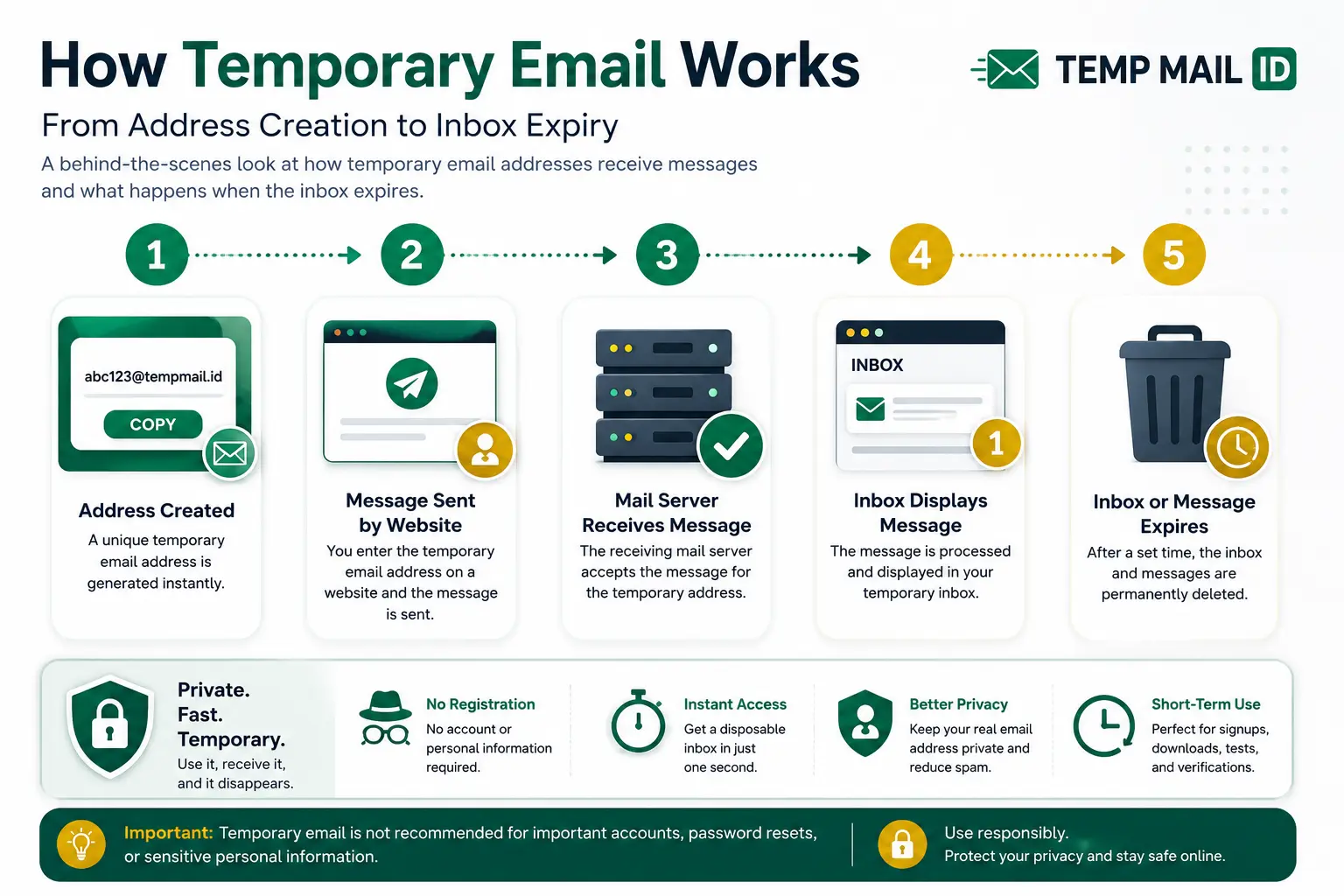
The basic temporary email lifecycle can be summarized in five steps:
Address created → Message sent by website → Mail server receives message → Inbox displays message → Inbox or message expires
Each step has a different role. The address gives the sender a destination. The receiving domain tells other mail servers where to deliver the message. The temporary email provider processes the incoming mail and connects it to the correct inbox. The browser then displays the message to the user.
Unlike a permanent mailbox, the final step is usually expiry. The inbox, address, or stored messages may stop being available after a session or a limited period.
Stage 1: Generating a Temporary Email Address
The first stage is address creation. A temporary email address generator creates a unique mailbox name and combines it with one of the service’s receiving domains. The result may look like a random sequence followed by the provider’s domain.
The mailbox name can be created using letters, numbers, or a combination of both. The goal is to make the address unique enough that messages can be routed to the correct temporary inbox.
In many cases, the user does not need to create an account, choose a password, or complete a registration process. The service creates the address automatically when the page loads or when the user requests a new inbox.
This makes temporary email faster than a traditional email account. However, it also means that the inbox may have fewer recovery and security options. If the browser session ends or the address expires, access may not be recoverable.
Stage 2: Connecting the Address to a Receiving Domain
An email address needs a working domain before it can receive messages. The part after the @ symbol tells sending mail servers where the message should go.
The temporary email provider controls one or more receiving domains. Those domains are configured with mail records that direct incoming messages to the provider’s mail infrastructure.
When a website sends a message to the temporary email address, its mail system looks up the destination domain. The sending server then attempts to deliver the message to the mail server responsible for that domain.
The temporary email address itself does not need a separate physical mailbox in the same way a traditional account might. The provider can dynamically associate the mailbox name with a temporary session or inbox identifier.
Stage 3: How Incoming Messages Reach the Temporary Inbox
When a website sends an email, the message travels through standard email delivery systems. The sending server contacts the receiving server for the temporary email domain and submits the message.
The receiving server checks the destination address. If the address matches an active temporary inbox, the system accepts the message and associates it with that inbox.
The service may process basic message information such as the sender, subject line, delivery time, message body, and attachments. The exact behavior depends on the provider and its technical design.
After the message is accepted, it is stored temporarily or made available through the inbox interface. The storage period may be short because temporary email is designed for quick access rather than permanent archiving.
Stage 4: Displaying New Messages in the Browser
Once the message reaches the provider, the inbox page needs to show it to the user. Temporary email services usually do this through browser-based updates.
The page may refresh automatically, check for new messages at regular intervals, or use a live connection to display messages as soon as they arrive. From the user’s perspective, the email simply appears in the temporary inbox.
The inbox may display the sender name, subject, delivery time, message content, links, codes, and attachments. The exact features vary between services.
A temporary inbox usually does not require a separate email application. The browser page acts as the mailbox interface. This makes it easy to receive email online without setting up a traditional account.
Stage 5: What Happens When the Inbox Expires
Expiry is one of the main differences between temporary and permanent email. A temporary inbox may only be available for a session or a limited amount of time.
When the inbox expires, several things may happen. The address may stop accepting messages. The browser may lose access to the inbox. Stored messages may be deleted. The address may also become unavailable for future use.
Users should not assume that an expired address can be recovered. Even if a similar address appears again, it may not connect to the same inbox or messages.
This is why temporary email should not be used for important accounts, long-term communication, paid services, or situations where password recovery may be needed later.
What Information Temporary Email Services May Process
A temporary email service must process some information to receive and display messages. This may include the destination address, sender address, subject line, email body, delivery time, links, and attachments.
The service may also process technical information related to the browser session, such as session identifiers, device information, or network data. The exact details depend on the provider’s privacy policy and infrastructure.
Temporary email can reduce exposure of your personal email address, but it should not be treated as complete anonymity. Websites may still collect browser information, IP addresses, device details, cookies, or activity data.
Users should avoid receiving sensitive personal information, financial records, confidential documents, private credentials, or account recovery messages in a temporary inbox.
Does Temporary Email Forward Messages to a Personal Inbox?
Most temporary email services do not forward messages to a personal inbox. Instead, they provide a separate browser-based mailbox where messages can be read directly.
This is different from an email alias. An alias normally receives messages at one address and forwards them to another permanent inbox.
A disposable email inbox is designed to keep short-term messages separate. That separation can help reduce clutter and prevent low-risk signups from reaching your primary email account.
Because messages are not usually forwarded, access depends on the temporary inbox remaining active. If the inbox expires, future messages may no longer be available.
Can Senders Identify That an Address Is Temporary?
Some senders may be able to recognize that an address belongs to a temporary email provider. They may use lists of known disposable email domains or automated domain reputation systems.
The address format itself may not always reveal that it is temporary. However, the domain can sometimes be identified as belonging to a disposable email service.
This does not change how normal email routing works. A message can still be delivered if the sender accepts the domain and the mailbox is active.
Temporary email should be used for legitimate privacy, testing, downloads, newsletters, and low-risk interactions. It is not a replacement for a permanent account when reliable identity, long-term communication, or recovery is required.
Why Some Websites Reject Disposable Email Domains
Some websites require permanent email addresses because they rely on email for ongoing account communication. They may need to send billing notices, security alerts, support messages, password resets, or account recovery links.
Other platforms may reject disposable domains because they want stable contact information or because their signup policies do not allow short-term inboxes.
A website may compare the email domain against a list of known temporary email providers. It may also use automated risk checks to decide whether the address is acceptable.
If a website requires long-term communication, use a permanent email address or a reliable alias. Temporary email is best for services where short-term access is appropriate and accepted.
How Long Does a Temporary Inbox Remain Available?
The temp mail inbox lifetime depends on the provider. Some inboxes remain available only during the current browser session. Others may stay active for a fixed period or until the user generates a new address.
Message retention may also differ from inbox lifetime. An address might continue receiving mail while individual messages are deleted after a shorter period.
Users should assume that temporary inbox access is limited unless the service clearly states otherwise. Important messages should not be stored only in a temporary mailbox.
If a short-term account becomes important, update the account to a permanent email address before the temporary inbox expires.
What Happens to Unread Messages After Expiry?
Unread messages may be deleted when the temporary inbox or storage period expires. The provider may remove both read and unread messages according to the same retention rules.
Once deleted, those messages may not be recoverable. The user may lose confirmation links, login codes, download links, or account notices that were not opened in time.
This is another reason to use temporary email only when the message is needed immediately. It is not designed as a permanent archive.
Temporary Email vs a Permanent Mailbox: Technical Differences
| Feature | Temporary Email | Permanent Email | Email Alias |
|---|---|---|---|
| Account creation | Often generated instantly without registration | Usually requires signup and account setup | Usually created through an existing provider or alias service |
| Message storage | Limited or short-term | Long-term, subject to storage limits | Stored in the destination inbox |
| Inbox lifetime | Temporary or session-based | Available while the account remains active | Available while the alias and destination inbox remain active |
| Password requirement | Often no password | Usually protected by a password | Managed through the main account or alias provider |
| Account recovery | Usually limited or unavailable | Typically includes recovery options | Depends on the alias provider and destination account |
| Forwarding | Usually no forwarding | May support forwarding | Forwarding is the main function |
| Long-term availability | Not designed for long-term use | Designed for ongoing communication | Suitable for ongoing communication if maintained |
Common Misconceptions About How Temp Mail Works
One common misconception is that temporary email does not use normal mail infrastructure. In reality, it still relies on domains, mail servers, routing, and message processing. The temporary part mainly relates to access, retention, and mailbox lifetime.
Another misconception is that temporary email automatically provides complete anonymity. It protects the personal email address, but other technical and account information may still be visible to websites.
Some users also assume that messages will remain available forever. Temporary inboxes are specifically designed for limited access, so retention should never be assumed.
Another mistake is treating temporary email as suitable for every account. It is useful for short-term interactions, but a permanent inbox is necessary when security alerts, recovery, billing, or long-term communication matter.
Situations Where a Temporary Inbox Is Useful
A temporary inbox is useful when you need to receive a message but do not need an ongoing relationship with the sender.
Common examples include newsletter confirmations, one-time downloads, product demos, short trials, website testing, QA workflows, event resources, low-risk signups, and temporary access to non-sensitive content.
It can also help reduce inbox clutter. Instead of sending every promotional or trial email to your personal account, you can use a temporary mailbox for short-term communication.
For a broader overview, explore the guides on Temporary Email, Disposable Email, and Temp Mail Inbox.
When a Permanent Email Address Is Still Necessary
A permanent email address is necessary when the account matters over time. This includes banking, payments, government services, healthcare, cloud storage, work collaboration, education, shopping accounts with order history, and paid subscriptions.
Permanent email is also important when password recovery, security alerts, billing notices, support communication, or legal records may be needed later.
If losing access to the inbox would cause a serious problem, do not use temporary email. Choose a secure permanent account or a reliable email alias instead.
How to Use Temp Mail ID Responsibly
Use Temp Mail ID for legitimate short-term purposes such as testing, newsletters, downloads, demos, low-risk signups, and privacy-conscious browsing.
Do not use temporary email for sensitive accounts, financial services, private documents, long-term subscriptions, or anything requiring reliable recovery.
Open incoming messages promptly because the inbox and message lifetime may be limited. If a temporary account becomes useful or important, update it to a permanent email address.
Temporary email should not be used for fraud, impersonation, abusive activity, unauthorized access, or misuse of verification systems.
Related Temporary Email Tools
Explore these related Temp Mail ID tools and guides:
- Temporary Email
- Disposable Email
- Temp Mail Inbox
- Receive Email Online
- Random Email Generator
- Anonymous Email
- Temp Email for Privacy
- Temp Email for Safe Signup
These pages explain temporary address generation, browser inbox access, privacy use cases, safe signup decisions, and related disposable email tools.
FAQ
How does temporary email work?
A temporary email service generates an address connected to a receiving domain. When a sender delivers a message, the provider’s mail server receives it, links it to the temporary inbox, and displays it in the browser.
How does temporary email receive messages?
The receiving domain directs incoming email to the temporary email provider’s mail server. The server checks the destination address and makes the message available in the correct browser inbox.
Do I need a password for temporary email?
Many temporary email services do not require a password. This makes access faster, but it also means recovery and long-term security options may be limited.
How long does a temporary email inbox last?
Inbox lifetime depends on the provider. It may last for a browser session or a limited period. Users should not rely on temporary email for long-term storage.
What happens when temporary email expires?
The address may stop receiving messages, browser access may end, and stored emails may be deleted according to the provider’s retention policy.
Does temporary email forward messages?
Most temporary email services display messages in a separate browser inbox rather than forwarding them to a personal account.
Can I recover an expired temporary inbox?
Usually, recovery is limited or unavailable. Important accounts should use a permanent email address with reliable recovery options.
Is temporary email completely anonymous?
No. Temporary email hides your personal email address, but websites and services may still process browser, device, network, and activity information.
Conclusion
Understanding how temporary email works makes it easier to use the tool with realistic expectations. A temporary address is generated, connected to a receiving domain, and linked to a browser-based inbox. When a sender delivers a message, the provider’s mail server receives it and displays it for a limited period.
The main advantage is short-term inbox separation. Temporary email helps users receive messages online without sharing a personal address for every low-risk signup, download, newsletter, demo, or test.
The main limitation is expiry. Messages, inbox access, and the address itself may not remain available. Temporary email should therefore be reserved for situations where long-term communication and account recovery are not required.
Temp Mail ID provides a practical way to generate a temporary email address, receive messages in the browser, and keep short-term communication separate from your main inbox.